Event Camera
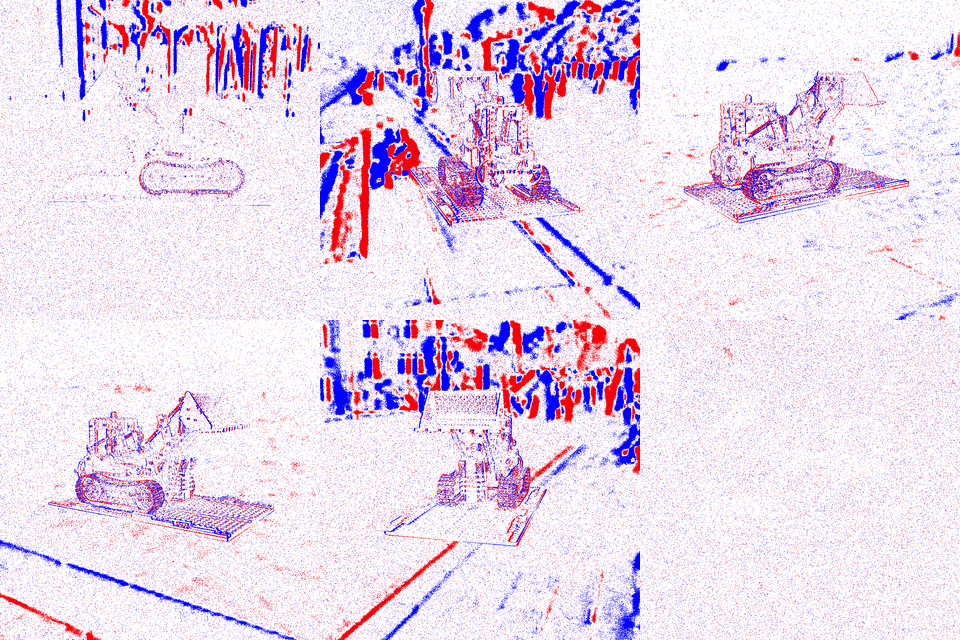
Event cameras, also known as Dynamic Vision Sensors (DVS), are bio-inspired sensors that operate fundamentally differently from conventional cameras. Instead of capturing intensity frames at a fixed rate, each pixel in an event camera independently and asynchronously signals when it detects a change in brightness.
These sensors offer several advantages over conventional cameras, including very high temporal resolution (in the order of microseconds), high dynamic range (up to 140 dB), and low power consumption.
Sensor Modeling
The DVS sensor models the response of individual pixels to changes in the log-intensity of the scene. Let \(I(x, y, t)\) be the intensity of light at pixel \((x, y)\) at time \(t\). The log-intensity is defined as:
An event is triggered at pixel \((x, y)\) and time \(t\) if the change in log-intensity since the last event at that pixel exceeds a contrast threshold \(C\):
An event is generated if \(|\Delta L| \ge C\). The polarity \(p \in \{+1, -1\}\) of the event indicates whether the brightness increased (ON event) or decreased (OFF event):
In practice, the thresholds for ON and OFF events may differ (\(C_{pos}\) and \(C_{neg}\)), and they are subject to noise and manufacturing variations, which can be modeled as a Gaussian distribution.
Our sensor modeling is based on v2e, and incorporates several non-idealities as described by Hu et al. [1]:
Threshold Jitter: Variations in the contrast threshold across pixels.
Refractory Period: A minimum time interval between consecutive events from the same pixel.
Leakage Current: Asynchronous events triggered by sensor imperfections even in the absence of brightness changes.
Shot Noise: Random events triggered by photon noise.
Photoreceptor Bandwidth: Limited temporal response of the sensor, modeled as a low-pass filter.
Emulation
To emulate an event camera from a sequence of frames, you can use the CLI:
$ visionsim emulate.events --input-dir=path/to/frames --output-dir=output/dvs --fps=1000
Parameters such as thresholds and noise rates can be adjusted:
$ visionsim emulate.events --input-dir=path/to/frames --output-dir=output/dvs --fps=1000 \
    --pos-thres=0.2 --neg-thres=0.2 --sigma-thres=0.03 \
    --cutoff-hz=200 --leak-rate-hz=1.0 --shot-noise-rate-hz=10.0
The output directory will contain:
events.txt: A text file where each line is an event in the formatt x y p(time in microseconds, x-coordinate, y-coordinate, polarity).frames/: A set of visualization frames showing ON events in blue and OFF events in red.params.json: The parameters used for the emulation.
Note
For this to give meaningful results, the input framerate should be high enough to capture the dynamics of the scene. We recommend using a framerate of at least 500 fps. These can be acheived using Interpolation.